Pages

Taylor swift- Lyrics Enchanted

Name  :  Taylor Swift  
Album :  Speak Now (Deluxe Edition)


There I was again tonight, forcing laughter, faking smiles
Same old, tired lonely place
Walls of insincerity, shifting eyes and vacancy
Vanished when I saw your face

All I can say is it was enchanting to meet you
Your eyes whispered, "Have we met?" across the room, your silhouette
Starts to make its way to me
The playful conversation starts, counter all your quick remarks
Like passing notes in secrecy

And it was enchanting to meet you
All I can say is I was enchanted to meet you

This night is sparkling, don't you let it go
I'm wonder-struck, blushing all the way home
I'll spend forever wondering if you knew
I was enchanted to meet you

The lingering question kept me up, 2 a.m., who do you love?
I wonder 'till I'm wide awake
Now I'm pacing back and forth, wishing you were at my door
I'd open up and you would say Heyyy

It was enchanting to meet you
All I know is I was enchanted to meet you

This night is sparkling, don't you let it go
I'm wonder-struck, blushing all the way home
I'll spend forever wondering if you knew

This night is flawless, don't you let it go
I'm wonder-struck, dancing around all alone
I'll spend forever wondering if you knew
I was enchanted to meet you

This is me praying that
This was the very first page, not where the storyline ends
My thoughts will echo your name until I see you again
These are the words I held back as I was leaving too soon
I was enchanted to meet you

Please don't be in love with someone else
Please don't have somebody waiting on you
Please don't be in love with someone else
Please don't have somebody waiting on you

This night is sparkling, don't you let it go
I'm wonder-struck, blushing all the way home
I'll spend forever wondering if you knew

This night is flawless, don't you let it go
I'm wonder-struck, dancing around all alone
I'll spend forever wondering if you knew
I was enchanted to meet you

Please don't be in love with someone else
Please don't have somebody waiting on you


bbm 2.0 update with voice call


   BBM 2.0 came time comes to bring great changes.
Release with version 2.0, is now BBM for iPhone / Android support phone calls and BBM social network called Channels. Features of the phone call was called Voice Calling. You can call other fellow users of BBM via WiFi networks and cellular networks. May be useful

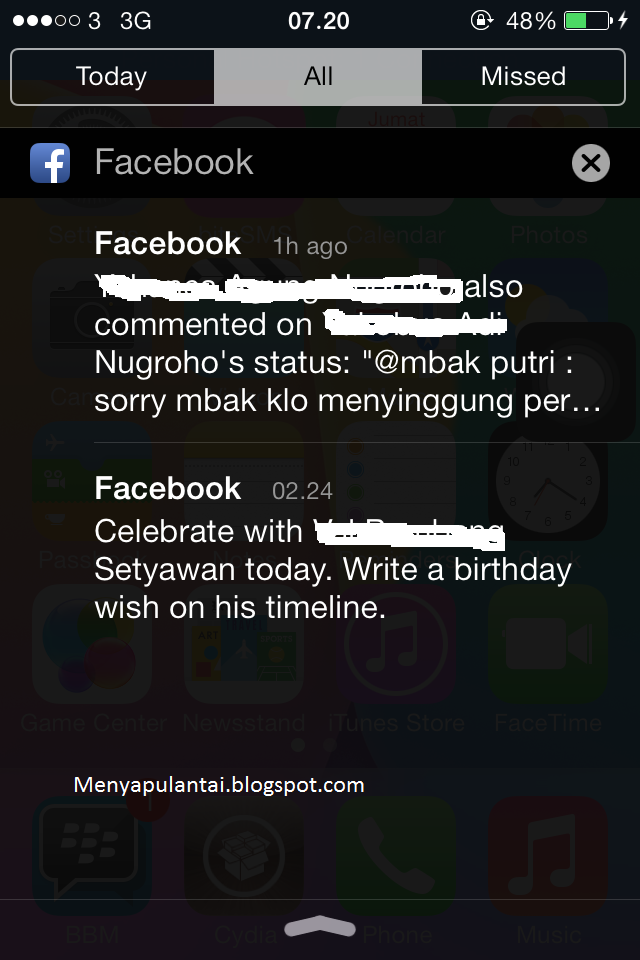
The way to eliminate Emerging Notifications in iOS 7


    Are you often bothered with notifications that appear suddenly and very disturbing use your iDevice?

It's easy, you just need to swipe upward to the right on the spot where the notifications appear. This will trigger a notification that went out ahead of you as soon as possible, and not have to wait a few seconds until the notification goes away by itself.

This of course would facilitate you to block the notification that appears when suddenly out of the blue and iOS devices interfere with your activities.

How to Restore Iphone/ Ipad without itunes


I will share how to restore iphone , ipad without itunes , first you have to download the application Ilex RAT.
Ilex RAT is a jailbreak app that serves as an application restore your iDevice is returned to its original state by removing all existing data on the iPhone , iPad and iPod Touch includes all jailbreak apps you have installed .Ilex RAT is very easy to use and very helpful.

Before performing a restore on your iDevice , download MobileTerminal application found on Cydia , repo 's previous address input http://cydia.myrepospace.com/iLEXiNFO/ first and then follow the steps below :
1 . Data backup is important
2 . To begin to restore , now open the application you have installed MobileTerminal
3 . Once open now type in "rat " ( without the quotes ) and press return
4 . Then there are 13 options and you select
     " Ilex - RESTORE : Revive , Speed ​​Up , Clean Up " .
5 . After that will come the question " Do you want to continue ? "
     Select y and press return .
6 . Just wait , Ilex RAT After successfully restore command will appear to reboot your iDevice is
     " Do you want to reboot ? " Select y and press return to reboot .
7 . completed.


The new function on win 8.1


After waiting for the windows finally released its newest product that is win 8.1, different functions of Windows 8 that is the START button shaped box. Let us look at some of the new functionality in Windows 8.1 below:

1. The existence of the Start Button
     Striking difference from Windows 8 that with the START button. 
     This feature is quite small, but this is enough to help the novice user to 
     the previous windows were accustomed to looking for the start button
     every time you start an application. 

2. Doing Automatically Update
    Given this new feature, we ddapat updates automatically every time develop apps
    released its newest version of the app store.

3. First look more attractive 
     Display opener a very interesting and well-formed, makes the user comfortable,
     the new settings in the Windows 8.1 allows us to choose the image and color
     of the desktop background color more and more diverse.

How to know the specifications laptop / PC

In the post below I will explain how to determine the hardware specs leptop / PC by using "DxDiag".
DxDiag displays information about installed DirectPlay Service Providers. It is possible to create a very basic chat rooms using a variety of network diagnostic and enter the IP address. Here you can also see Bios, Proccessor, RAM, system models, the Direct version.


How to know the specifications laptop / PC as follows:
1. I am using Win 8.1 click on start and then type "DxDiag"
2. Wait a minute until the program"DxDiag"
3. Finished, very easy and hopefully useful

How do Install IPA file with iFunBox on Windows

iFunBox is an application that functions to install iOS-based applications without having to use itunes or itunes sync to your device.
I've tried to do it and 100% successful.
how to Install IPA file with iFunBox in Windows as follows :
1. we downloaded iFunBox application in
    http://i-funbox.com/
2. We prepare a file with format. IPA
3. Do not forget we connect first iDevice
    (iPhone, iPad) into your PC
4. Then we click iFunBox classic toolbar,
    then we select the install app.
5. We are looking for a file with the format. IPA then select open,
    it will automatically installed it self
6. If you have been successful it would appear Succees posts in iFunBox
   if you install the application successfully